
Turntable Module
The Model Vista Turntable Module is an optional licensed Module for presenting a loaded model on a controllable rotating platform. It is not required for standard Model Vista model review.
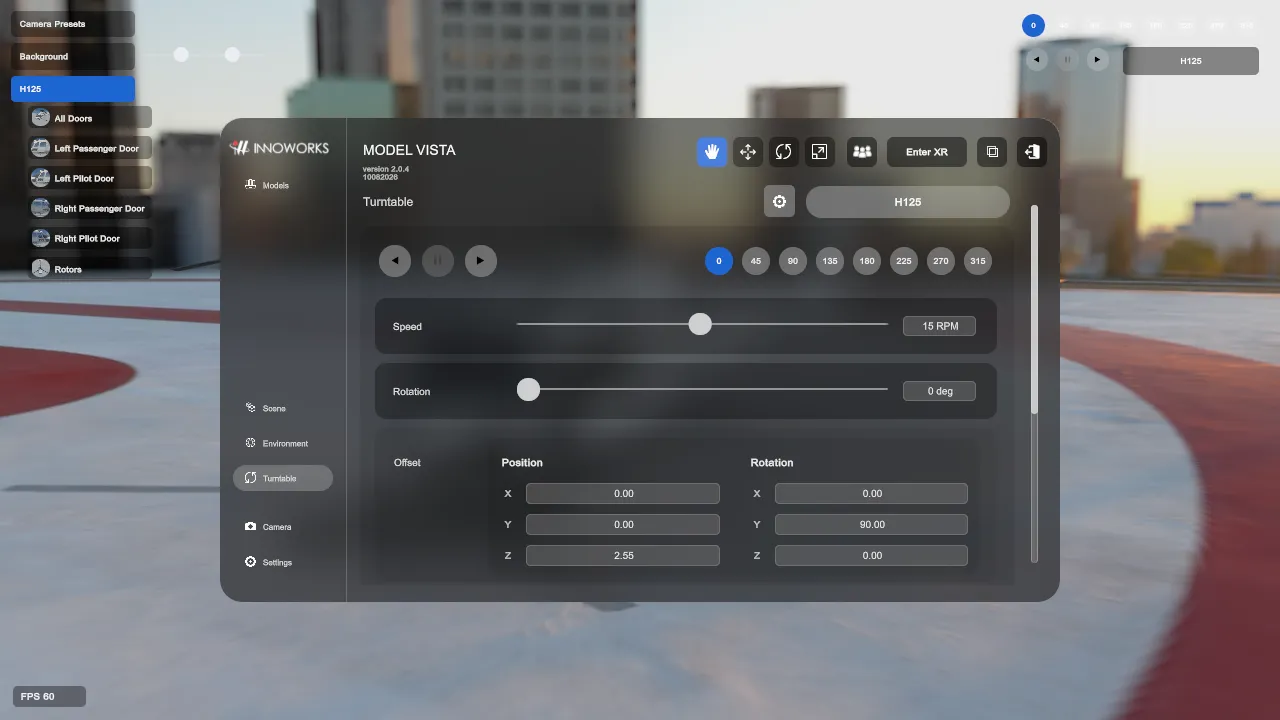
Requirements
Section titled “Requirements”Compatible Model Vista Versions
Section titled “Compatible Model Vista Versions”| Application | Compatible versions |
|---|---|
| Model Vista for Windows | 2.0.4 or a compatible later release |
Additional Requirements
Section titled “Additional Requirements”- A Turntable Module entitlement enabled under Settings > License.
- At least one loaded model.
Quick Start
Section titled “Quick Start”- Load a GLB model in Model Vista.
- Open Turntable:
- In the Default interface, select Turntable in the navigation.
- In the Experimental interface, select Turntable in the right panel.
- Select the loaded model from the model selector.
- Select forward play, pause, or reverse play.
- Set Speed between
0and30 RPM, or select an angle button to move directly to a 45-degree increment. - Adjust Offset if the model is not centered or oriented correctly on the platform.
- Enable Show Presentation Controls when compact turntable controls should remain available with the main interface hidden.
To remove the active model from the turntable, choose no model in the Turntable selector or use Release from Turntable in the selected model’s Transform controls.
Model Vista is an INNOWORKS product.