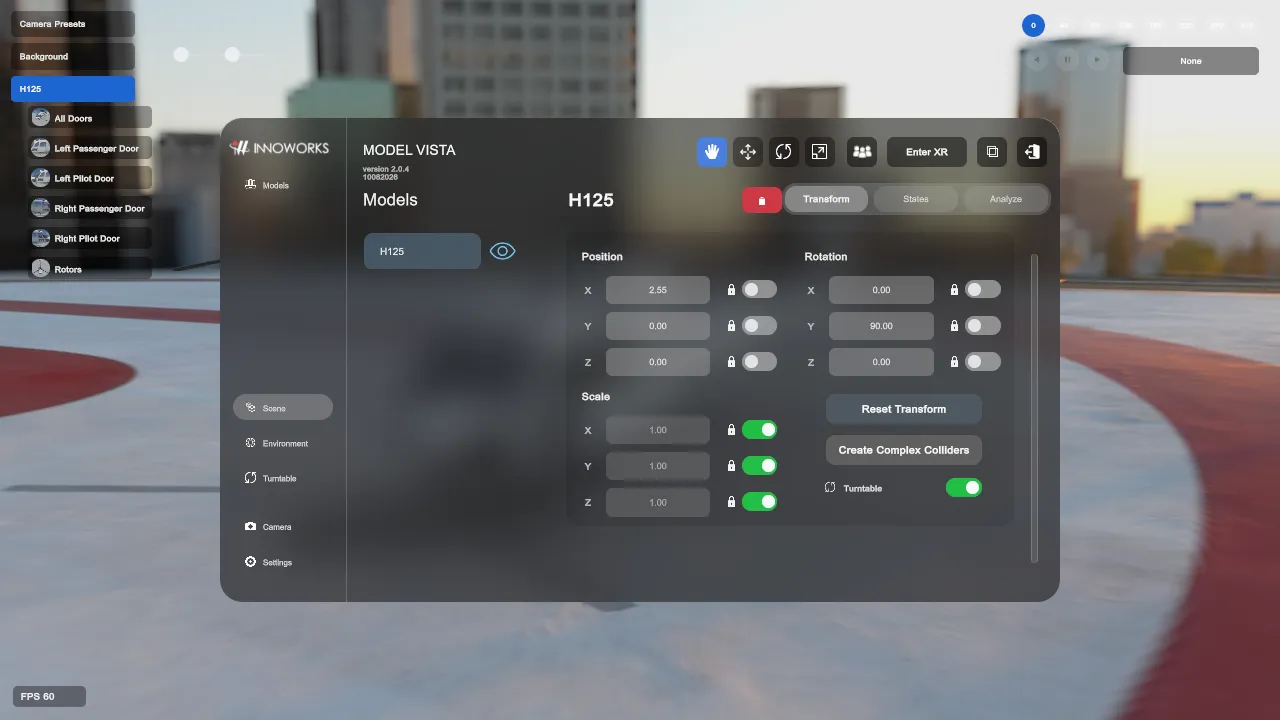
Scene And Model Properties
The Scene list manages loaded GLB instances. In the Default interface, the list and properties share the Scene page. In the Experimental interface, select the model under Scene and use the Properties panel.
Select And Manage Models
Section titled “Select And Manage Models”- Select a loaded model to make it the active scene object.
- Press
Fin the scene to fly the desktop camera to the selected model. - Delete the selected model when it is no longer needed.
- Licensed Modules can add model actions after the Module is enabled. Those actions are documented in the Module manual.
Transform
Section titled “Transform”The Transform tab exposes position, rotation, and scale fields. Each axis has a lock toggle, and the scene gizmos can manipulate the selected model directly.
- Reset Transform restores the initial placed transform or moves the model to world origin while retaining its initial scale, depending on the model’s placement context.
- Create Complex Colliders replaces the initial box colliders with detailed generated colliders. Select it again to restore box colliders.
- Settings > Models > Lock Scale by Default controls whether newly loaded interactive models start with their scale axes locked.
States
Section titled “States”When a GLB contains Model Vista configurator extension data, the States tab exposes its configured groups and options.
- State changes can control object visibility, material assignments, and other authored review options.
- Material-backed options use the material/state selection dialog where the importer provides the required data.
- A GLB without Model Vista extension data still loads normally, but it has no configurator States.
Analyze
Section titled “Analyze”The Analyze tab shows file and runtime details for the selected model, including source information and collider status.
On supported desktop HDRP systems, Wireframe highlights the selected model and Thickness adjusts the overlay line width. This wireframe analysis view is not available in XR.
Background GLBs are visual environment assets and do not create model grab interactables or colliders.